

Is It Safe to Convert Your Bank Statement Online?
The question that decides it is where your statement is processed, and you can check the answer yourself in about a minute.
On this page
The short answer: it can be, and the question that decides it is where your bank statement is processed.
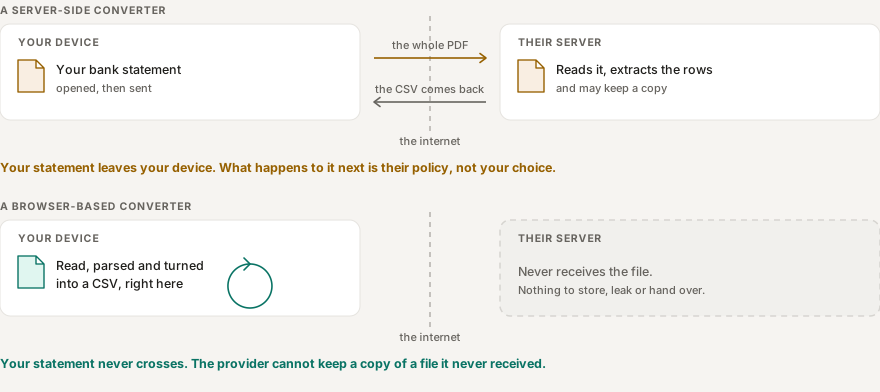
Some bank statement converters upload your PDF to a server. Others process it locally, inside your browser. From the outside the two look identical: choose a PDF, wait a moment, download a CSV or Excel file.
The privacy difference is not small. With a server-side converter, your statement leaves your device. With a browser-based one, it does not have to.
This guide explains the difference, what to check before using any converter, and how to verify for yourself what happens to your file.
What is actually in a bank statement
A statement holds far more than a balance. Depending on the bank and the country, it can include:
- your name and address
- your account number, sort code or IBAN
- every transaction date and amount
- the names of merchants and payment recipients
- your salary and other incoming payments
- your opening and closing balances
Taken together, those transactions describe where you shop, who pays you, what you owe and when you travel. That is a detailed picture of your life, not just your money.
None of which means you should never use an online converter. It means you should know what happens to the file before you hand it over.
Two ways a converter can process your PDF
Server-side: your statement is uploaded
Your browser sends the PDF over the internet. A server reads it, extracts the transactions, and sends the result back.
This is common, and it is not automatically unsafe. Plenty of legitimate services work this way.
But your statement has left your device, so you are now relying on the provider’s security and data handling. Worth asking:
- Is the file encrypted in transit?
- Is it stored after conversion, and if so for how long?
- Who operates the service?
- Does the privacy policy actually say how uploaded documents are handled?
A statement deleted the moment it is processed and one kept for 24 hours are different propositions, even though both end in deletion.
Client-side: your statement stays in your browser
The code that reads the PDF runs on your machine. The file is opened and analysed there, and the CSV or Excel file is built there. Nothing needs to be sent anywhere for the conversion to happen.
That removes one whole category of risk: a service cannot retain, leak or be compelled to hand over a file it never received.
It does not make the process risk-free, and you should be suspicious of anyone who says it does. Your computer, your browser, your extensions and the file you download all still matter. But the document itself does not have to travel.
How to check whether a converter uploads your file
You do not have to take anyone’s word for this, including ours. Your browser will tell you.
- Open the converter.
- Open developer tools. On most desktop browsers, press F12, or right-click the page and choose Inspect.
- Go to the Network tab.
- Turn on Preserve log if it is offered.
- Choose a PDF and run the conversion.
- Watch what appears while the file is being processed.
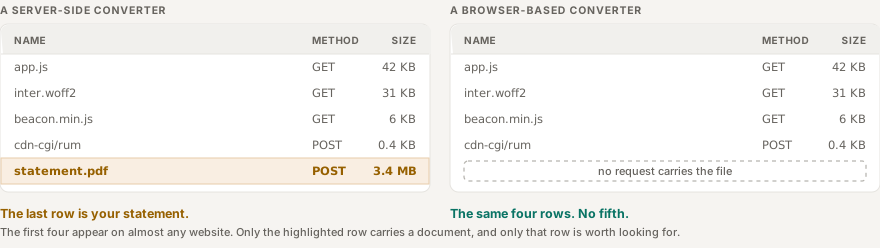
You are looking for a request that carries the document itself, usually a POST with a substantial request body.
A browser-based converter will still make ordinary requests: JavaScript, fonts, stylesheets, analytics, images. Network activity on its own proves nothing. The question is not “did the page make requests?” but “did a request contain my statement?”
What this test does and does not tell you
You are watching one conversion, of one file. A converter could behave differently with a larger document, or on a code path you did not happen to exercise. A clean Network tab is strong evidence about what just happened in front of you. It is not a guarantee about every case.
It is still far better than trusting a claim on a marketing page, and it takes about a minute.
Test with something that is not your bank statement
If you are trying an unfamiliar converter, start with a sample PDF or any other document you would not mind losing. Learn how the tool behaves first. Decide about your real statement afterwards.
What to check before using any converter
Where is the file processed?
Look for a plain answer. “Bank-level security” is marketing. “Your PDF is processed in your browser and is not uploaded” is information.
If it is uploaded, how long is it kept?
A server-side service should name a retention period. A general assurance that files are safe is not a retention policy.
Is there a real privacy policy?
It should say what the site collects, how documents are handled, and who operates the service, or at least give you a way to reach a human.
Does it require an account?
An account is not a red flag by itself, but it changes the picture: your activity becomes attached to an email address. For a one-off conversion, not needing one means less of you on file.
Is the site served over HTTPS?
HTTPS stops what passes between your browser and the site from travelling as readable text. It is table stakes for anything handling financial documents. It tells you nothing about what the site does with the file once it arrives.
What “safe” actually means
Any converter can call itself secure. It is more useful to separate the risks it does and does not address.
Keeping the PDF on your device removes the provider’s copy. If the statement is genuinely processed locally, there is no file on their servers to be stored, breached, subpoenaed or sold. That is a real and significant reduction.
It does nothing about a compromised device. Local processing cannot help against malware on your machine, a browser extension with broad permissions, or anyone else who can sit down at your computer. For sensitive documents, use a device and a browser you trust.
The CSV is just as sensitive as the PDF. Privacy does not end when the conversion does. An exported file holds the same transactions, balances and account details, in a format that is easier to search, copy and forward. Treat it exactly like the original, and think twice before it lands in a shared folder or an email attachment.
How DTLOVA handles your statement
DTLOVA’s bank statement converter processes your PDF in your browser. The file is read on your device, and the parsing runs in a Web Worker so that a large or malformed document cannot lock up the page. There is no account and no sign-up.
Because the work is local, you can check this yourself with the Network-tab method above rather than relying on us saying so. That is the point of describing the method in an article that also recommends our own tool: a claim you can test is worth more than a claim you cannot.
One thing you will see if you look: this site loads a small analytics script, and it sends a request of its own. It reports page views. It does not receive your statement, and its request is the same size whether you convert a two-page statement or a forty-page one. The privacy policy covers what the website itself collects, which is a separate question from what happens to your file.
We would rather tell you where the file is processed than tell you the conversion is secure. The first is a fact you can verify. The second is a word.
A five-point checklist
Before converting a bank statement online:
- Where is the PDF processed? Look for a specific answer, not a security adjective.
- Is it uploaded? If the site does not say plainly, check the Network tab, or test with a file you do not care about.
- If uploaded, how long is it kept? A named retention period, not a reassurance.
- Is it asking for more than it needs? A one-off conversion rarely needs an account.
- How will you look after the export? The CSV can be as revealing as the statement.
The best architecture in the world will not protect a CSV you email to yourself and forget about.
The one-minute version
Ask one question before you upload anything: where does my file go?
If it goes to a server, read the provider’s retention and privacy policy and decide whether you trust it.
If it is processed in your browser, the statement can be converted without ever being sent.
And if you would rather verify than trust, open the Network tab and watch.
You can convert a PDF bank statement to CSV or Excel in your browser with DTLOVA’s converter.